Home » SAP (Page 3)
Category Archives: SAP
Tools used to check slowness in an SAP System.
In SAP systems, there are several transaction codes (Tcodes) and tools available to check and analyze system slowness. Here are some commonly used ones:
- ST03/ST03N: These Tcodes provide workload and performance statistics for SAP systems. You can analyze system performance, identify top transactions, and check response times.
- STAD: This Tcode allows you to analyze the workload of the SAP system and provides detailed statistics on user activities, executed transactions, and response times.
- SM50/SM66: These Tcodes display the process overview and can help identify any long-running or stuck processes that might be causing system slowness.
- ST05: This Tcode is used for SQL trace and can help analyze the performance of database calls made by SAP transactions. It allows you to identify slow-performing database queries.
- SE30: This Tcode is used for runtime analysis and can help identify performance bottlenecks in ABAP programs. It provides detailed information about the execution time of each statement and subroutine.
- SM21: This Tcode displays the system log and can help identify any system-related errors or issues that might be causing performance problems.
- SAP Solution Manager: It provides a range of tools for monitoring and analyzing system performance, including End-to-End Root Cause Analysis (RCA) and Performance Monitoring Dashboards.
- SAP EarlyWatch Alert: It is a proactive monitoring service provided by SAP that analyzes system performance, identifies potential issues, and provides recommendations for performance improvements.
- SAP Performance Optimization Workload Analyzer (PWA): It is a powerful tool for analyzing workload and performance data. It helps identify performance bottlenecks, provides optimization recommendations, and supports capacity planning.
find if a parameter is dynamic in HANA
We many times need to know whether a hana parameter is dynamic or a restart is required to make it effective. To check this goto below
- open cdexe on the OS side, if you already configured this alias
- otherwise go to the folder “cd /usr/sap/$SAPSYSTEMNAME/SYS/exe/hdb”
- open the config folder by command “cd config”
- open the Master ini files you need with the editor (do not adjust value in these files)
- check the hint for the parameter you are looking for, there you will find configure online or offline
Example

Below files contains details about
- Default values (not to be adjusted)
- /usr/sap/<sid>/HDB<inst>/exe/config
- /hana/shared/<sid>/HDB<inst>/exe/config
- Valid for a specific service (e.g. indexserver) or component (e.g. multidb) on all hosts
- /usr/sap/<sid>/SYS/global/hdb/custom/config/<service_or_component>.ini
- /hana/shared/global/hdb/custom/config/<service_or_component>.ini
- Valid for all services on all hosts
- /usr/sap/<sid>/SYS/global/hdb/custom/config/global.ini
- /hana/shared/<sid>/global/hdb/custom/config/global.ini
- Valid for a specific service (e.g. indexserver) or component (e.g. multidb) on a specific host <host>
- /usr/sap/<sid>/HDB<inst>/<host>/<service_or_component>.ini
- /hana/shared/HDB<inst>/<host>/<service_or_component>.ini
- Valid for all services on a specific host <host>
- /usr/sap/<sid>/HDB<inst>/<host>/global.ini
- /hana/shared/<sid>/HDB<inst>/<host>/global.ini
understanding sgen and pxa buffer
There are n number of ABAP program in the system used for various functionalities/purposes, all these ABAP programs are stored in REPOSRC, for example below are the total number of programs in a S4HANA system.

Some are kind of must programs that needs to be compiled instantly when a user logs into the system or executes a transaction code. These compiled codes are placed in a table REPOLOAD, for example below are the total entries in a S4HANA system.

This table REPOLOAD is tightly integrated with PXA buffer, the PXA buffer is controlled by below parameters
- abap/buffersize
- abap/pxa_cache
- abap/pxa_preload
- abap/buffer_fragments
we can see the utilization of PXA or program buffer in ST02

Now,
- When we start the AS ABAP Server, pxastat and pxanew in work directory is created, first wp-1 loads pxauserload, then pxanew, then pxastat, then will rename pxanew to pxastat, this deletes old pxastat, the pxa buffer is filled up to the percentage specified in abap/pxa_preload, once it is reached the preload is stopped. Once wp shutsdown it writes its pxa to pxanew.

- if we run the ABAP program (or tcode) first time, it compiles and stores in REPOLOAD then stores in PXA buffer.
- If we run another time the same ABAP program (or tcode), and the compiled program in REPOLOAD is changed then it will relook in REPOSRC compile it, place the compiled program in REPOLOAD, whenever a program is compiled it is placed in PXA buffer.
Now as I mentioned above parameters, there can be situations where the program might be dropped, then it will be again picked up from REPOLOAD into PXA, now if DB version is different we will get dump LOAD_PROGRAM_LOST.
Now if we activate a program from SE80 or SE38 then the activation timestamp is changed and PXA marks it as old, this information is sent to all abap servers asynchronously. Then all the reactivation process mentioned above is carried out.
With S4HANA we have a new job introduced with 1909, “SAP_SGEN_REGENERATE_LOADS”. The purpose of this is to minimize waiting times for users or developers by regenerating invalidated loads.

This job is periodic job which runs every hour, and run sgen for invalidated loads.
References
- 2849402 – Jobs in the Technical Job Repository (SJOBREPO) in SAP S/4HANA 1909
- 2190119 – Background information about SAP S/4HANA technical job repository
- 2849337 – Jobs in the Technical Job Repository (SJOBREPO) in SAP S/4HANA 1809
- 2581518 – Jobs in the Technical Job Repository (SJOBREPO)
- 672268 – Runtime error LOAD_VERSION_LOST
- 1259546 – Short dump LOAD_VERSION_LOST as of Release 7.0
- 438038 – Automatic regeneration of invalidated loads
- 1989778 – FAQ: SGEN
- 2905158 – SGEN is triggered frequently in the system higher than S/4HANA 1909
- 23642 – Description of pxanew and pxastat
- https://wiki.scn.sap.com/wiki/display/ABAP/PXA+%28Program+eXecution+Area%29+-+ABAP+Program+Buffer
- https://wiki.scn.sap.com/wiki/pages/viewpage.action?pageId=464696199
uninstall hana cockpit
Note: The versions in my system is below
- SAP HANA Database – version 2.00.047.00.1586595995
- SAP HANA XS Advanced Runtime – version 1.0.127.426
- SAP HANA Cockpit Stack – version 2.0.12.14.0
To Uninstall HANA cockpit please follow below.
- GoTo /hana/shared/<Cockpit_SID>/hdblcm
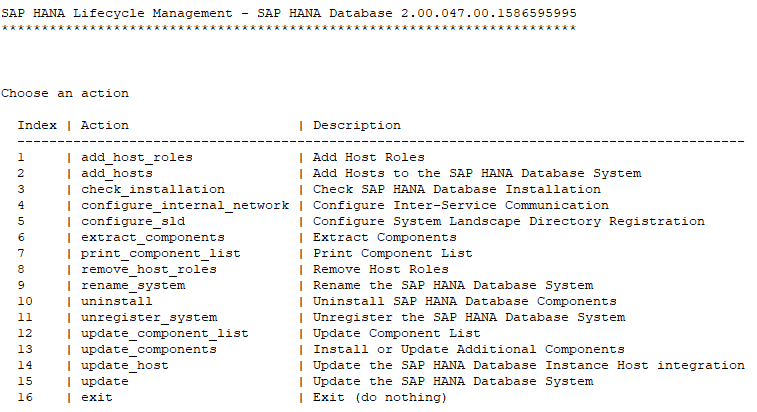
- choose option 10, then it will give you below options.

- to uninstall all component choose all, or choose the required option and it will give you prompt for y/n, if everything looks good press y to proceed.

- then uninstallation will start and once it completes it will give you below details, you should also check the log file mentioned at the last for any issues.

How to find SAP ABAP Schema Name?
DB2
db2 "select tabschema from syscat.tables where tabname = 'SVERS'"

Oracle
SELECT username from dba_users where default_tablespacenot in ('SYSTEM','SYSAUX');
Log utilization in DB2
How to find log utilization in DB2?
-
db2 "select * from sysibmadm.log_utilization"
What do we mean by logs?
<in Progress>
How to find all schema names in DB2?
- How to find all schema names in DB2?
-
db2 connect to <db_name>
-
db2 "select schemaname from syscat.schemata" OR
-
db2 "select distinct tabschema from syscat.tables"
-

-
List all Kernel Parameters
In every Kernel Patches, either sap changes some parameter or adds/remove a parameter. If we are planning to add a new parameter we have to first verify if the parameter is supported by KERNEL or not. OR we can check by going through its particular note.
To do this follow below step to check if the parameter is included in the KERNEL or not
sappfpar all # will give list of all parameters
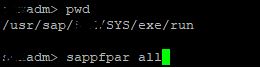
You can grep to check the parameter is supported in your KERNEL or not.

IDEALLY we should run sappfpar check after doing parameter changes, especially memory related parameters, but for planning for adding of new parameters we can use this step.
Important Links
* https://wiki.scn.sap.com/wiki/display/SI/SAP+Kernel:+Important+News
You must be logged in to post a comment.